
Every IT asset accounted for — from purchase to retirement.
Civic Mesa Asset Management & Lifecycle is a complete IT asset system your department can run on its own: every device, license seat, and warranty in one register, with a CMDB that ties each asset to the person who holds it and the tickets it appears on. Follow an asset through its whole life — in stock, assigned, in repair, retired — on an append-only history you can stand behind at audit time. Acquire it by itself to replace an aging IT asset or CMDB tool — or turn it on beside the rest of the Civic Mesa suite. Either way, it's built to be the best product in its category.
Every device and license, from purchase to retirement.
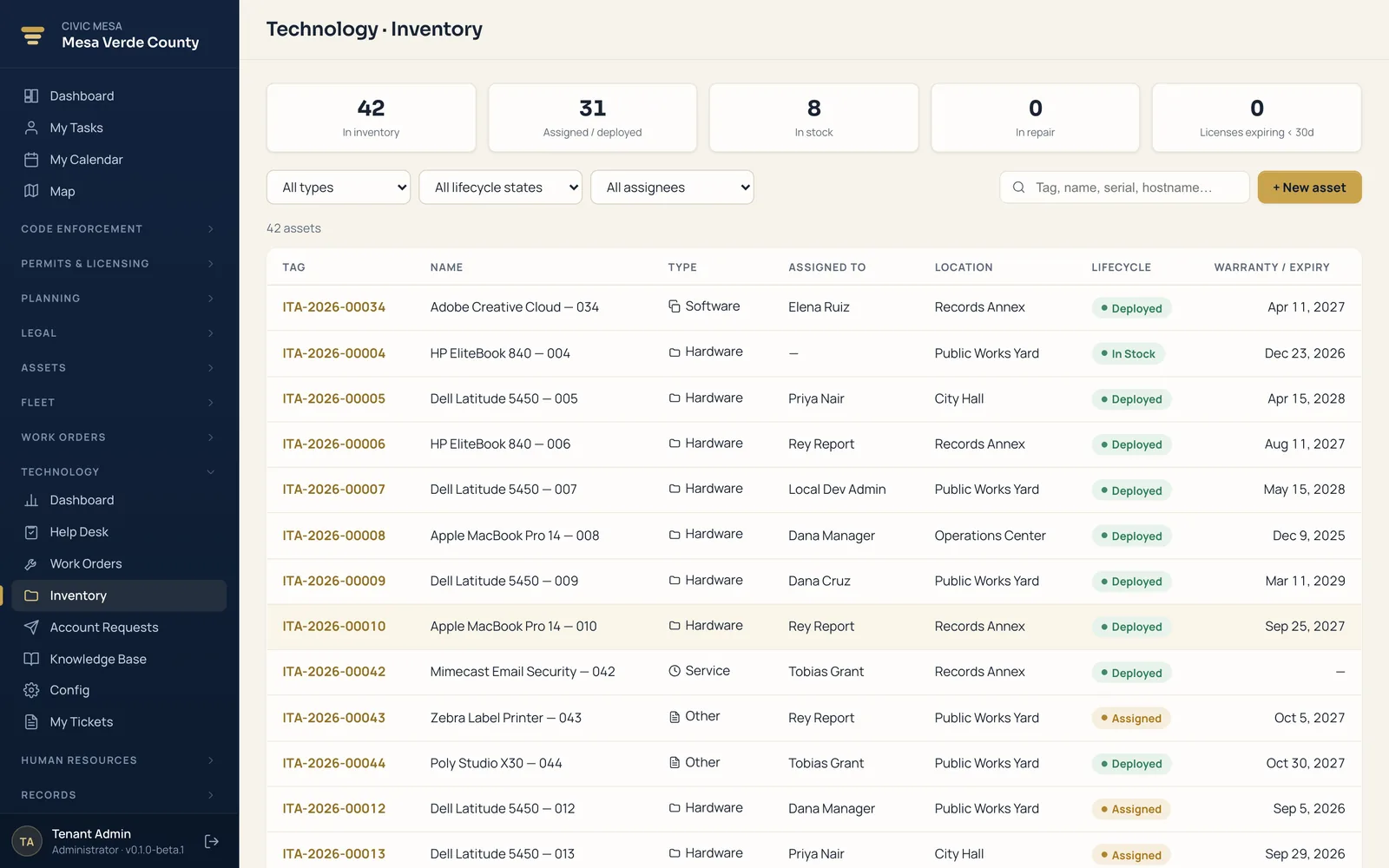
Keep your whole IT estate in one register — a live inventory and CMDB where every device, license seat, and warranty carries a lifecycle state and links to its owner and its tickets. Procure it, assign it, repair it, and retire it as steps forward on the same record, with every move written to an append-only history. When coverage or a license is about to lapse, an attention list tells you before it does.
- IT inventory & CMDB
Every device, license seat, and warranty in one register with a lifecycle state — in stock, assigned, in repair, retired — and a link to the tickets it is tied to.
- Full lifecycle tracking
Follow each asset from procurement to assignment to repair to retirement, with every move recorded on an append-only history.
- Warranties & renewals
Assets bucket into expired, expiring-soon, and active, with an attention list before coverage or a license lapses.
- Software & license seats
Track software licenses and seat counts alongside hardware, so you know what is deployed and what is due to renew.
- Tied to people & tickets
Each asset links to the staff member who holds it and the Technology tickets it appears on, so context is one click away.
- Assign, reclaim, audit
Assign, reassign, and reclaim devices with a recorded custody trail, and run audits so you always know who has what.
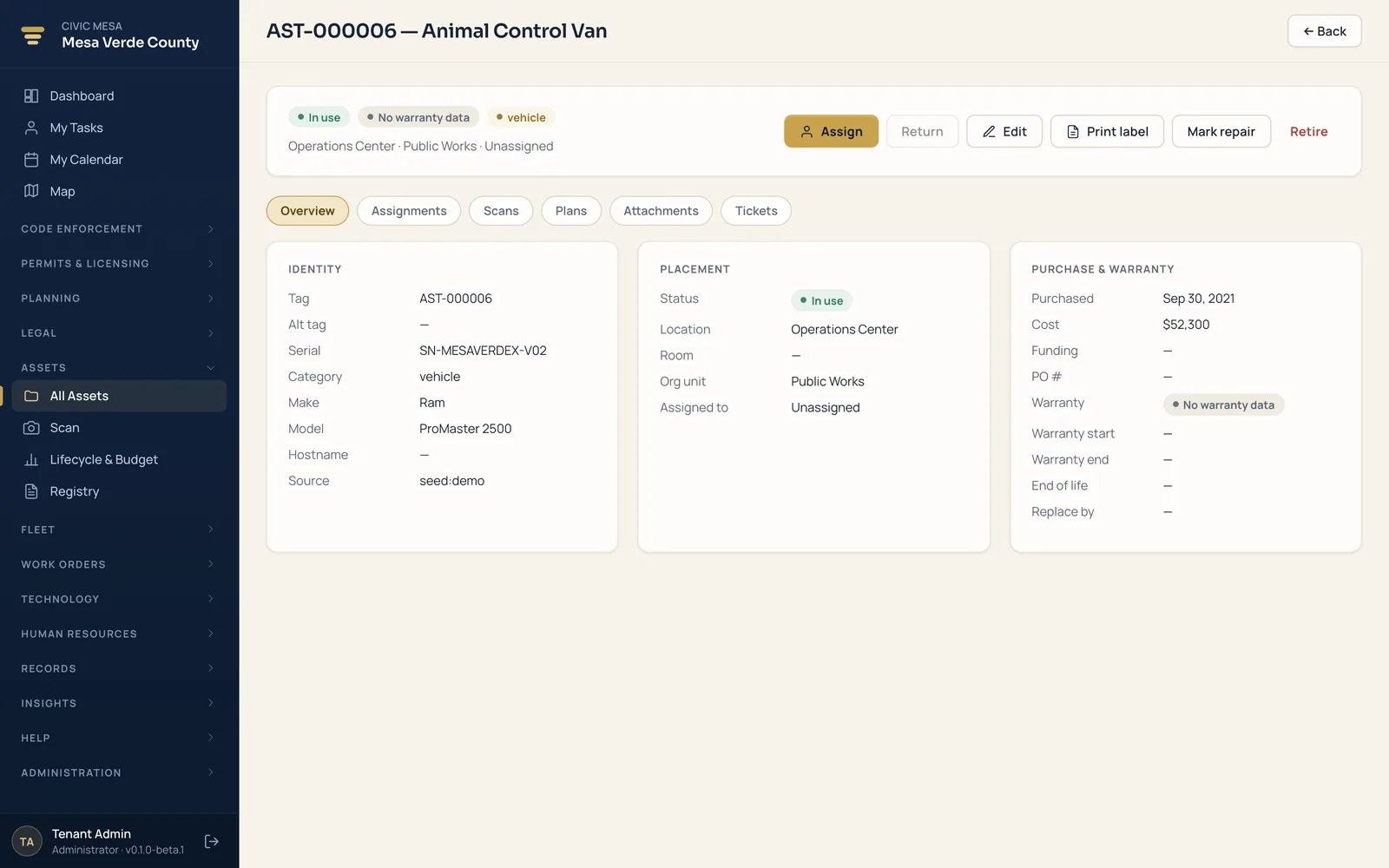
One device, its owner, and every ticket it touched.
Open an asset and you get its full story: where it is in its lifecycle, who holds it now, when the warranty runs out, and every move it has ever made. Reassigning or reclaiming it is a step forward on the same record — not a re-key into a second system.
- Tied to people and tickets. The asset links to the staff member who holds it and the Technology tickets it appears on, so context is one click away.
- Assign, reclaim, audit. Assign, reassign, and reclaim the device with a recorded custody trail — and run audits so you always know who has what.
- An append-only history. Every procurement, assignment, repair, and retirement is written down and never quietly rewritten.
Right-sized for any local government — not just big IT shops.
Asset Management & Lifecycle scales from a one-person IT shop to a full department. It's the same top-tier product whether you're a county tracking thousands of devices across departments or a village keeping tabs on a couple dozen laptops and a rack of switches.
Counties
Track thousands of devices and license seats across departments and sites, coordinate multiple technicians, and hand finance a clean picture of asset age, warranties, and refresh spend.
Cities & towns
Keep the whole estate — laptops, phones, switches, and software licenses — in one register, with each device tied to the staffer who holds it and the tickets it appears on.
Villages & small municipalities
A one- or two-person IT shop gets a real CMDB instead of a spreadsheet — no separate asset tool to license, and every user is included in the price.
Special districts & authorities
Water, fire, transit, and housing authorities manage their own hardware and software estate with the same lifecycle register, custody trail, and renewal alerts.
A full product today. A platform when you're ready.
Buy Asset Management & Lifecycle by itself and run your whole IT estate on it. Add another Civic Mesa product later and it clicks in under the same umbrella — the same people, assets, and history — with no migration and nothing re-keyed.
Add Technology
A help-desk ticket already knows the device and its owner — technicians see the asset's warranty and history the moment the ticket opens, without hunting a second system.
Add Work Orders
Send a failing asset to a costed repair on the same record, so the repair cost lands against the device and its lifecycle history stays whole.
Add Reporting & Analytics
Turn the register into asset age, spend, and refresh forecasts — so budget season starts with real numbers instead of a guess.
See Asset Management & Lifecycle on your own IT estate.
Book a demo, then run a pilot on your real devices, licenses, and branding — import from your current asset or CMDB tool, dry-run first, and evaluate on your own inventory. Flat per-module pricing with unlimited users, and your data stays portable, so there's no lock-in.