Run your whole local government on one data core — one product at a time.
Most government “all-in-one” suites are years of acquisitions wired together after the fact — the data still lives in separate systems behind one login. Civic Mesa is one system: every product shares the same property, people, and map from day one. Turn on the one you need now, add the rest as you grow — they're already unified.
shared data core
priced per module
re-keying
your data any time
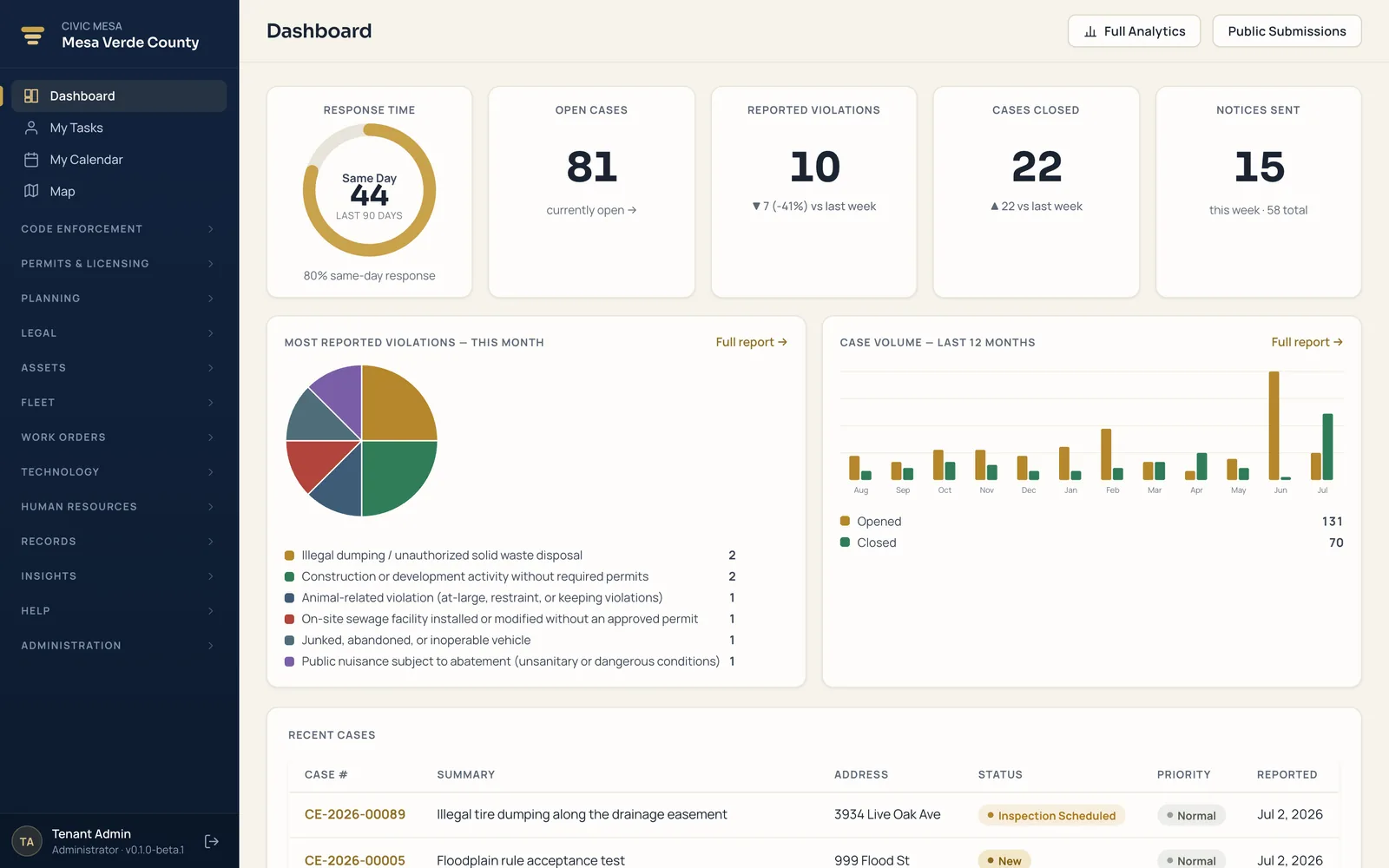
The real staff app your office logs into every day — one login across every product.
Stop running your local government on five systems that don't talk.
A permitting vendor here, spreadsheets there, a separate 311 line, paper files in a back room. Civic Mesa puts a permit, a code case, and a work order on the same property, people, and map — one system of record for the whole jurisdiction. Turn on modules as you grow. Nothing gets re-keyed.
 One data coreproperty · people · map
One platform. Eleven products. Six mission areas.
Buy the product that fixes today's bottleneck, or run the whole suite — every module shares one data core, one login, and one flat per-module price with unlimited users.
Community Development
Land use from the front counter to enforcement.
ExploreResident Engagement & 311
One branded front door for residents.
ExploreMaintenance
Keep buildings, facilities & vehicles in service.
ExploreTechnology & IT
Run your IT department and every device you own.
ExplorePeople & Administration
Hire, manage, and support your workforce.
ExploreData & Analytics
One set of numbers across every function.
ExplorePriced per module. Every user included.
You license the modules your county turns on — a flat annual rate for each. Every employee, inspector, clerk, and seasonal hire uses them at no extra cost. No per-seat fees, no counting logins, no surprise true-ups at renewal.
Priced by the login
- Every new hire, inspector, or seasonal worker adds cost.
- Staff share logins or go without access just to save money.
- License audits and headcount true-ups at renewal.
- A budget that moves every time your team does.
Priced by what you turn on
- One flat rate per module — choose exactly the modules you need.
- Unlimited users: give access to every department and every seasonal hire.
- No seat counts, no audits, no reclaiming logins to save a license.
- A predictable line item you can forecast, approve, and defend.
One record, end to end.
A single resident complaint travels the whole platform on the same case number — no re-keying, no re-import, nothing drifting out of sync between offices.
Resident reports tall grass at your branded portal.
Converted to a code case in one click.
Scheduled, geolocated, photo evidence attached.
PDF notice from your own template.
Escalates to a court case — same file.
Same case number. Same evidence. No re-keying.
A branded front door for residents.
Give residents a branded place to report a concern and check status with no account — from any phone or desktop, in plain language, tied straight to the case your staff work.
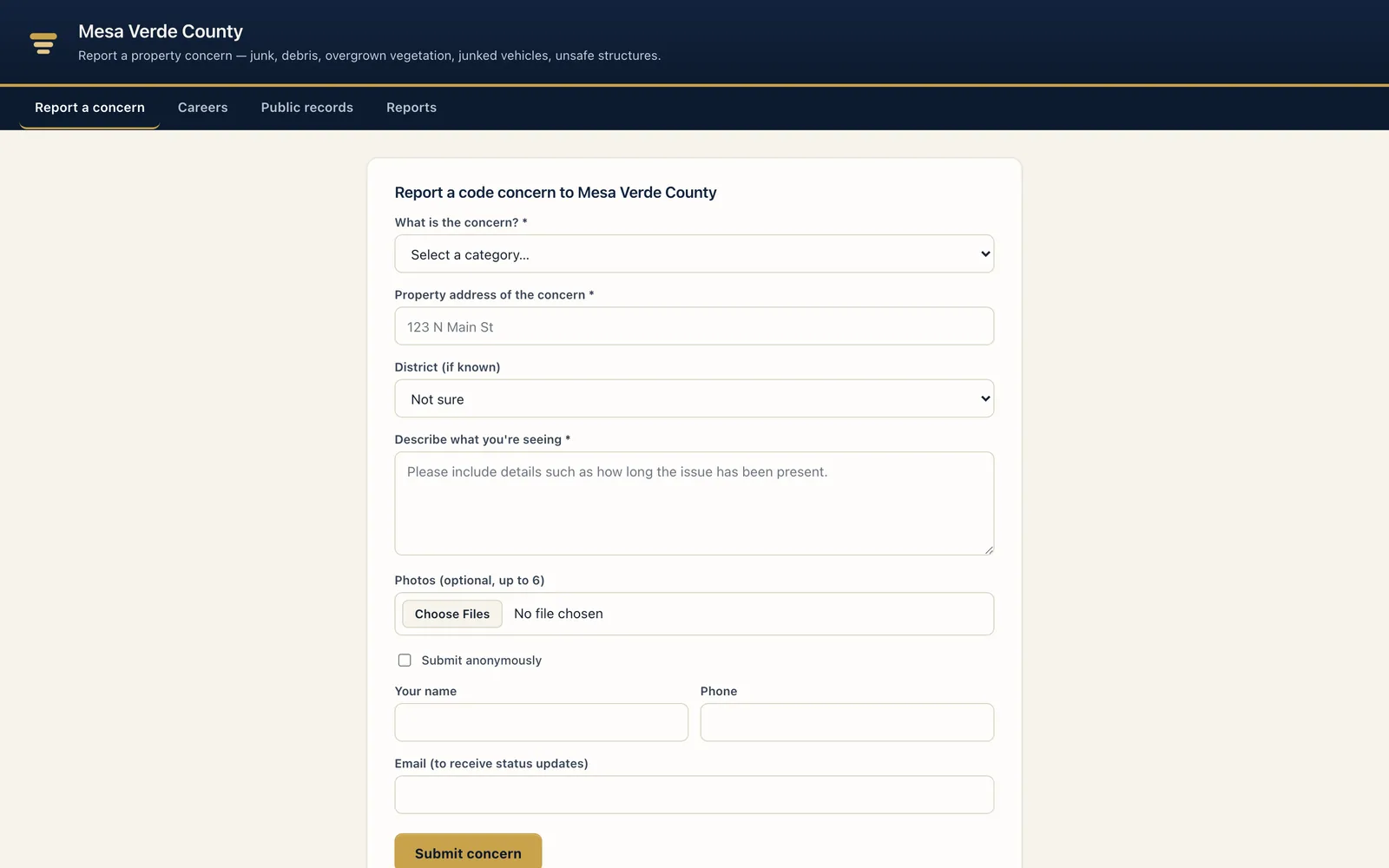
Your branded public front door — residents report a concern with no account, then check status by tracking code.
- Report with no account. Category, address, description, and up to six photos — anonymously or with contact details for updates. No login to create.
- Status by tracking code. Residents follow a report from Received to Opened as a case — cutting “what happened?” calls to your front desk.
- Publish only what you choose. Optional read-only transparency surfaces for permits, cases, and planning projects — each CSV-downloadable, off until you turn them on.
- Your brand, your domain. County seal, colors, and a custom domain — plus an easy CMS to stand up a full public website. See resident engagement →
Kept separate. Yours to keep.
Every jurisdiction's records are walled off in the database itself, your staff sign in the way they already do, and your data is yours to export or move elsewhere — any time, no lock-in.

One jurisdiction can never see another's data — the separation is built into the database, so it holds even if there's a bug in the software above it.
Access follows the Microsoft accounts your IT team already manages, and every change is on the record — who, what, and when — for the next audit or records request.
Import your history from a legacy vendor with the in-app Migration Center, and export your jurisdiction in open formats whenever you want. No lock-in
Civic Mesa is not SOC 2 certified; the protections above describe how the system actually works today.
See it on your own jurisdiction.
Book a demo, then run a pilot with your county's real records, districts, and branding — no long procurement runway to prove it out. Import from your current vendor, dry-run first, and evaluate module by module. Your data stays portable, so there's no lock-in.
Book a demo
A working walkthrough mapped to your office's jobs — intake, cases, permits, mapping, and reporting on one data core.
Step 1Run a pilot
Stand it up on your own records and districts. Import from your current vendor, dry-run first, and evaluate module by module.
Step 2Keep your data
Export your jurisdiction whenever you want. Portable by design — no lock-in, no long procurement runway to get started.
Step 3